Rcopia Login Info For ePrescribe Users
To use E-Prescribe, a user must be registered on the Rcopia Website. Contact First Insight Corporation for help in registering.
After registration is complete, Rcopia user information must be entered in the Integrated Services module of MaximEyes SQL.
- Step-by-step
- Add ePrescribe User Info
- Edit ePrescribe User Info
- Delete ePrescribe User Info
- Related topics
Step-by-step
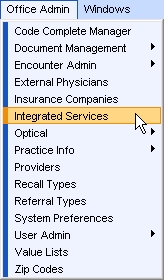
- Select Office Admin menu
 Integrated Services.
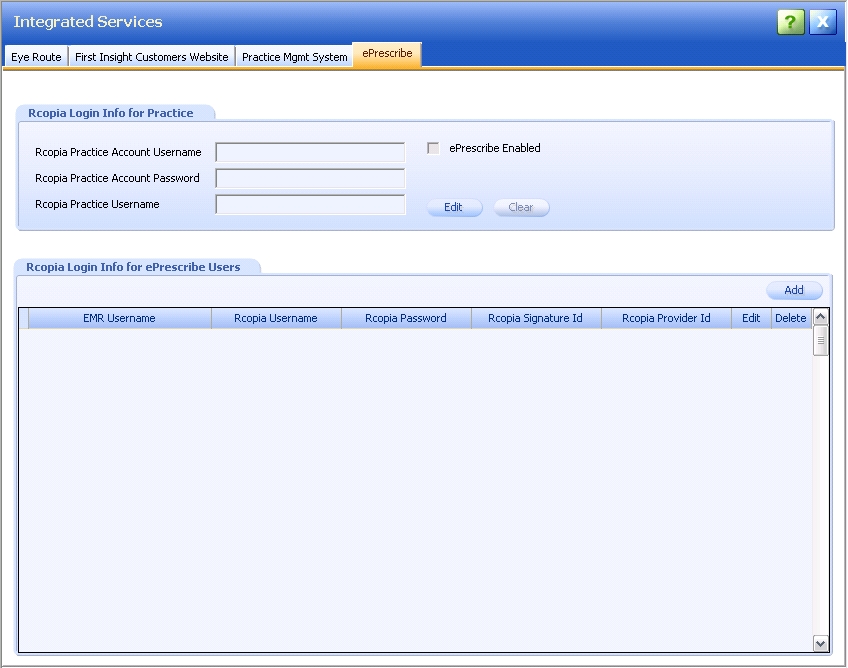
- Click the E-Prescribe tab. The E-Prescribe window displays.
Add ePrescribe User Info
- Click the Add button on the Rcopia Login Info for ePrescribe Users tab.
- The Add ePrescribe User Info popup displays.
- The cursor is in the Select User field.
- Required fields are marked with a red asterisk. *
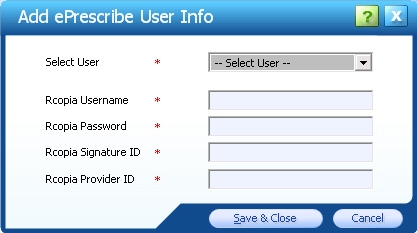
- Complete all fields.
- To close the Add ePrescribe User Info popup and save changes, click the Save & Close button.
- To close the popup without saving changes, click the Cancel button.
- The updated Rcopia Login Info for ePrescribe Users tab displays.
- The Rcopia Password and Rcopia Signature ID are hidden.
- To make additional changes to the fields, click the Edit button.
- To delete the Rcopia login information, click the Clear button.

Edit ePrescribe User Info
- Click the Edit button.
 The Edit ePrescribe User Info popup displays.
- The cursor is in the Rcopia Username field.
- The Rcopia Password and Rcopia Signature ID display as plain text.
- All fields except the Select User field can be changed.
- Required fields are marked with a red asterisk. *
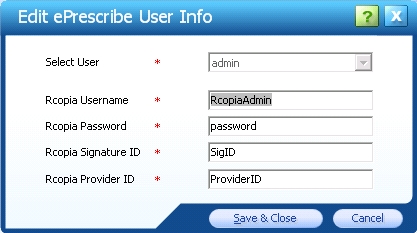
- Make changes as desired.
- To close the Edit ePrescribe User Info popup and save changes, click the Save & Close button.
- To close the popup without saving changes, click the Cancel button.
- The updated Rcopia Login Info for ePrescribe Users tab displays. The Rcopia Password and Rcopia Signature ID are hidden.

Delete ePrescribe User Info
- Click the Delete icon
 in the row of the ePrescribe User you wish to delete. A warning displays.
- Click Yes to confirm the deletion. Click No to cancel the deletion.
- The Rcopia Login Info for ePrescribe Users tab updates to display accordingly.
 Top of Page